

what is a portfolio?
A portfolio is more than a collection of your work – itʻs your professional identity and digital handshake to the world. It represents:
-
Your creativity, skills, and problem-solving abilities
-
Your growth as a designer or creator
-
The kind of work you want to keep doing
Think of it as a visual story that helps employers understand your journey, style, and potential.
Do's and dont's
The quick tips and common mistakes every creative should know before hitting “publish.”

Do's
-
Keep your layout neat, clean, and easy to navigate
-
Use high-resolution visuals only
-
Limit your portfolio to your 6 strongest projects
-
Include subpages with short project descriptions
-
Maintain consistent branding – colors, fonts, and tone
-
Add a personal logo, color scheme, and tagline
-
Update your portfolio regularly
-
Seek feedback and improve over time
Dont's

-
Donʻt include outdated or low-quality mockups
-
Avoid too many fonts or colors – keep it professional
-
Donʻt overcrowd your pages – use white space wisely
-
Avoid inconsistent branding or cluttered visuals
-
Donʻt include work you wouldnʻt want to do again
key elements of a strong portfolio
Your portfolio should reflect who you are, what you can do, and how you think. Hereʻs what makes a portfolio stand out to employers and clients:

1. structure and design
-
Make your portfolio look professional and easy to navigate
-
Keep the layout clean and consistent
-
Use a neutral background that lets your work stand out
-
Add clear navigation for each project
-
Include around six of your strongest projects - quality over quantity
-
Choose a simple, professional domain name
-
Example: www.yourname.com or www.yourname.myportfolio.com
-

2. include content that represents you
Your content should tell your story and show your strengths:
-
Feature projects you’re proud of and want to do more of
-
Show your range of styles and skills
-
Add spec projects (self-initiated work) if you lack client pieces
how to create spec projects:
Spec projects show initiative and creativity – even before professional experience
-
Choose a brand (real or made-up)
-
Pick an advertising medium (poster, campaign, app, etc.)
-
Define your target audience
-
Start designing!
-
Use online briefs for inspiration

3. about me section
This is your chance to introduce yourself:
-
Share a short biography (your background, goals, and design story)
-
Show your personality — who are you as a person and designer?
-
Include a photo or logo, your brand colors, and a short tagline
EXAMPLE:
“I’m a Honolulu-based designer who loves crafting visual stories that connect people and place.”

4. project descriptions
Each project should tell a mini story. Employers want to see how you think – not just what you made. Ask yourself the following questions when describing your project:
-
What was the problem?
-
What was your creative approach?
-
What tools or skills did you use?
-
What was the result or impact?

5. contact information
Make it simple for people to reach out:
-
Add a call-to-action like “Let’s work together!” or “Contact me”
-
Include your email address and social links
-
Consider a contact form for quick messages

6. design portfolio platforms
Choose a platform that fits your style, skill level, and budget:
Best for beginners and creatives. Easy to use, free, and has great community exposure.
Best for designers using Creative Cloud. Integrates with Behance platform and includes a polished design.
Best for artists looking for customizable sites. Includes drag-and-drop tools that creates flexible websites
Best for creatives wanting a professional looking portfolio. Templates include sleek designs that are great for personal branding.
Best for designers looking for a simple and quick portfolio setup. Templates are beginner-friendly and great for visual learners.
Best for developers or advanced users. Wordpress is high customizable with wide plugin suport.
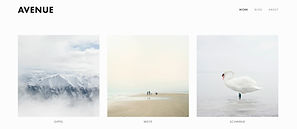
creative portfolio EXAMPLES
Explore standout portfolio templates that showcase creativity, storytelling, and design excellence.


faq's
(frequently asked questions)
1. how often should i update my portfolio?
Every few months or whenever you complete new work. Keep it fresh and relevant.
2. What if i'm skilled at multiple medias?
Call it out, but focus on your dream job. That's the portfolio you're building for.
3. should i show process work or only final designs?
Be genuine, tell your story, and show the kind of work you want to do in the future.